.png)
Overview
The Invoices functionality is used to manage invoices issued by Crassula to White label partners. It serves as a billing and control mechanism operated by Crassula administrators.
Invoices are created within the White label’s Admin Panel by Crassula administrators and represent charges payable by the White label to Crassula. The functionality is intentionally separated from payment execution and does not initiate or process payments in the system.
White label administrators have read-only access to invoices and can only review and download them for payment outside the platform. If an invoice becomes overdue, the administrator will see a notification indicating its status.
-
Invoices are informational and billing-related only; they do not trigger payments or accounting operations.
-
All status changes are performed manually by Crassula administrators to ensure billing accuracy.
To view and download invoices, an administrator must have the Invoices access role enabled.
Opening invoices
Follow the steps below to access Invoices:
-
Open the Admin Panel.
-
Navigate to Administration → Invoices.
The page displays a list of invoices issued for the current White label, along with their statuses and related metadata.
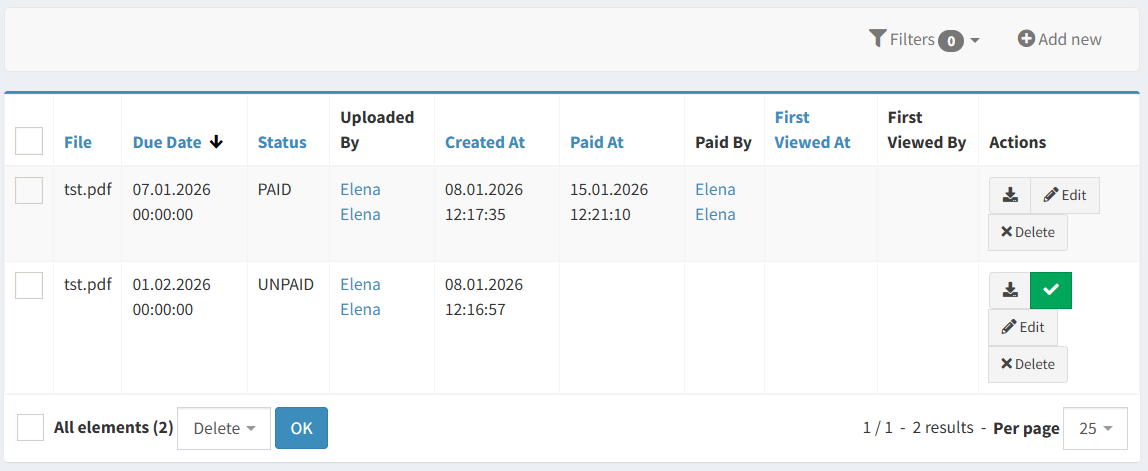
Available actions
The following actions are available for White label administrators:
-
View the list of issued invoices
-
Download invoice files in PDF format using the

No other actions are available to non-Crassula users.
Workflow
-
A Crassula administrator creates an invoice in the White label’s Admin Panel.
-
The invoice is uploaded in PDF format and becomes visible to the White label.
-
The White label administrator reviews and downloads the invoice.
-
Payment is completed outside the platform.
-
A Crassula administrator confirms receipt of funds and marks the invoice as Paid.
Component parameters
|
Parameter |
Description |
|---|---|
|
File |
The invoice document uploaded in PDF format. |
|
Due date |
The date by which the invoice is expected to be paid. |
|
Status |
Current invoice state (Unpaid or Paid). |
|
Uploaded by |
Crassula administrator who uploaded the invoice. |
|
Created at |
Date and time when the invoice was created. |
|
Paid at |
Date and time when the invoice was marked as paid. |
|
Paid by |
Crassula administrator who marked the invoice as paid. |
|
First viewed at |
Timestamp of the first invoice view. |
|
First viewed by |
Administrator who opened the invoice first. |
|
Actions |
Available actions depend on the invoice status and the administrator’s access role. The following actions are supported:
All actions are logged in the system for audit and tracking purposes. |