.png)
Overview
The Activity Log records all actions performed by administrators within the Admin Panel, providing a comprehensive audit trail of system changes. This log helps monitor administrative activities, track modifications, and ensure compliance with internal security policies.
This section captures and displays a chronological record of changes made by administrators. Each entry includes essential metadata such as timestamps, affected entities, and descriptions of modifications.
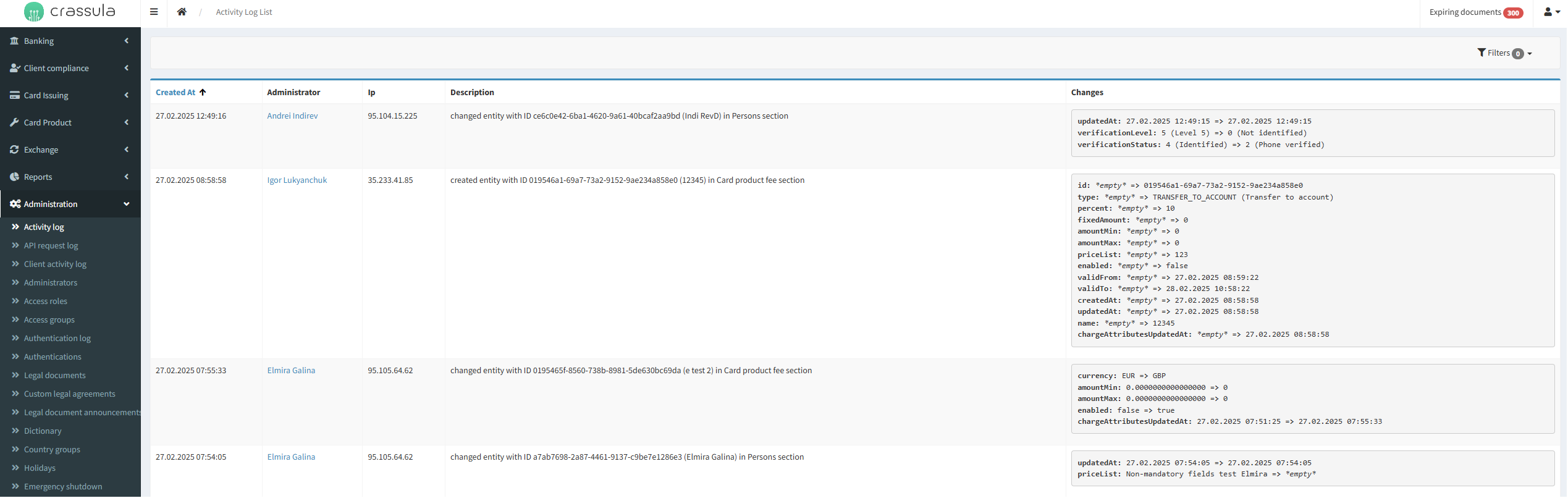
How to Access the Activity Log
-
Navigate to the Admin Panel.
-
Go to the Administration section.
-
Select the Activity Log menu item.
Parameters
|
Parameter |
Description |
|---|---|
|
Created At |
The timestamp when the action was recorded. |
|
Administrator |
The administrator who performed the action. |
|
IP Address |
The IP address from which the action was made. |
|
Description |
A summary of the change or action performed. |
|
Changes |
A detailed breakdown of the specific modifications made to an entity. |
|
Filters |
Allows narrowing down logs based on Created At, Administrator, Section, or Entity ID. |